Exploring Java Architecture: Insights on JVM, JDK, Memory Model, and Execution Engine
An in-depth beginner's guide to Java's inner workings, covering CPU basics, memory management, class loading, and JVM internals.

Before knowing about Java JDK, I would like to discuss few things in general.
Giga hertz: The clock speed, which measures how many cycles the process the processor executes per second.
CPU cycle is nothing but a tick in a clock.
If CPU frequency is 4 GHz that means it can execute 4 billion instructions in a CPU cycle [ A TICK ]
  def test():
      print "Hello World";
The above code take O(1) space complexity.
This also takes some time to execute internally but very negligible almost very very small that is why we say constant time in DSA. [ Ignore this point and below 4 points if you don’t know DSA ]
When the program is runned, we check how the code is performing (Space & Time).
O(n) → It is considered as normal.
O(n²) → It is not advisable.
O(n³) → Restricted practice, No program should take this complexity.
In NFT’s, code should be performed in Nano Seconds (Trading companies).
In Product based companies and other companies, It will take O(n) & Rare case O(n²).
What is Stacks and Heaps ?
Stack memory and Heap memory you might of heard while learning any programming language.
These stacks and heaps are just division of memory. Logical representation of memory.
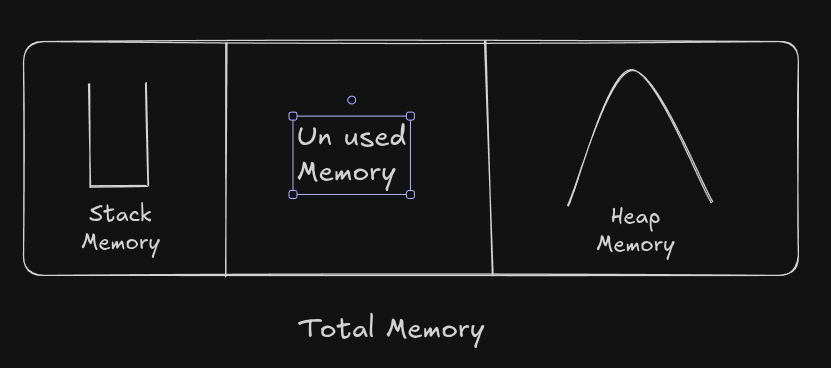
Let’s Learn Java:
In Java everything is Object except primitive data types.
If we want to run a program, we need:
CPU
Primary Memory - RAM
Secondary Memory - HDD
Input output devices.
All these are controlled or Governed by government called Operating System.
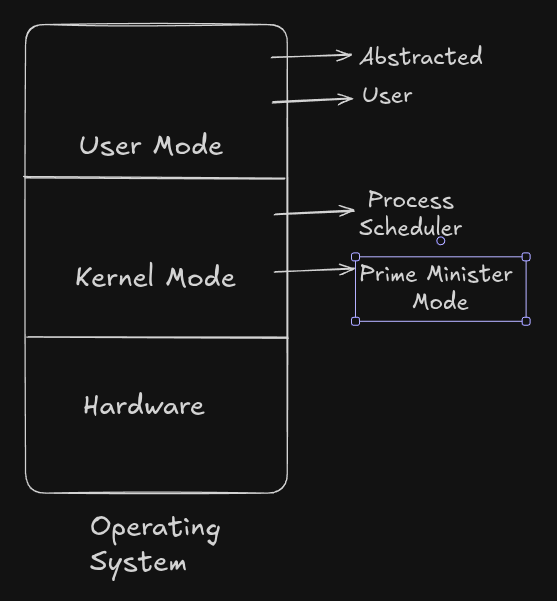
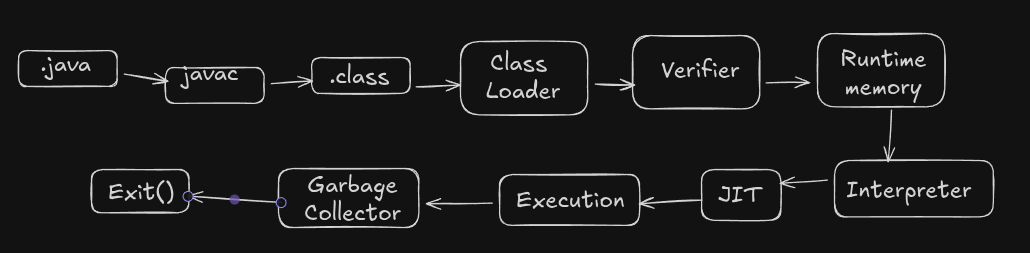
How Java program is runned ?

Why many levels, these are much more in specific to java. Above is a generalized diagramatic representation
These many levels are for abstraction & security not everything should be known by everyone.
Program: Set of instructions
Process: A program whose state is running is called process.
What is JDK ?
For now just know that to run a java application we need JDK.
Java Design of JDK, JVM and JRE:
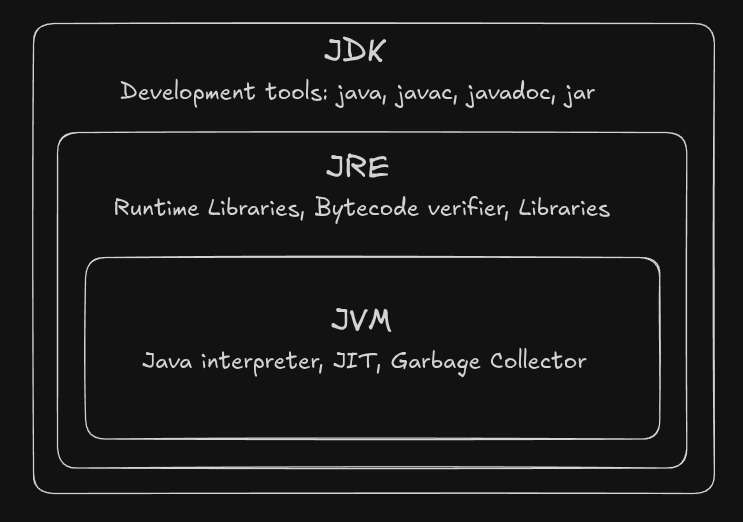
JVM [Java Virtual Machine] :
javac Hello.java # Generates Byte code file.
# .java -----> .class
Java is popular for write once run anywhere.
.java is the extension of the Java file and when we compile .class file will be generated.
.class file contains
byte code which is only understood by JVM.
Metadata
Constant pool
Field/Method info
JVM is a runtime engine. It does :
Loads Java classes.
Verifies the byte code.
Manages memory.
Executes instruction.
Handles Garbage Collections (GC).
UFFFF!!! What are the above terms ? Those terms scare you when you heard for the first time. Its queit normal. Just stay with me till the end of the blog, Everything make sense.
Virtual Machine(VM) is just a replication of the normal computer.
- A computer with in a computer with shared resources.
Registers are faster than anything.
  -start:
      MOV RO, #OxFFFFFF
      MOV R1, #5
      MOV R2, #4
      MOV R3, #3
      ADD R4, R0, R1
      ADD R5, R2, R3
Whenever we build a java spring project or something
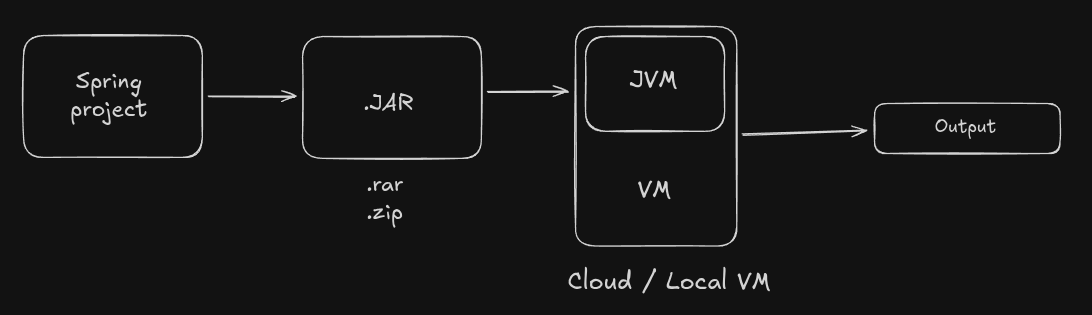
JVM Internal Architecture:
Source code
  public class Hello{
      // Some code.
  }
Java compiler converts
javac Main.java
Key components of JVM:
1. Class Loading [ Class loader Subsystem ]
It loads .class files into memory
3-level class loaders:
Bootstrap class loader:
- Loads core java classes (java.lang, java.util)
Extension class loader:
- Loads external libraries (Packages - Like in npm if you know)
Application class loader:
- Loads user-written classes
Steps inside class loader:
Loading
Linking (Links)
Verification
Preparation
Resolution
Initialization
2. Byte code Verifies (Security Gate):
Checks no memory violations, Stack overflow correct instruction format, Type safety, No Illegal casting,
No pointer hacking.
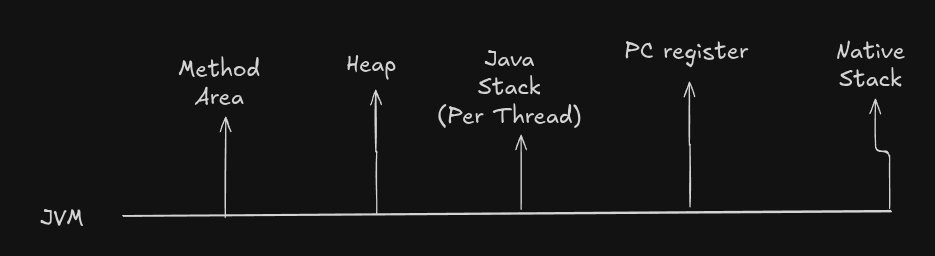
3. Runtime Data Areas:
Method Area:
Class structures.
Static variables.
Method byte code.
Constant pool.
Heap Memory:
All objects.
Instance vars.
arrays.
GC operates here.
Stack Memory: Each thread has stack frames containing
Local vars.
Operand stack.
Return address.
Method reference.
Program counter: PC register
Address of the next instruction.
Keep track of each thread’s progress.
JVM utilizes a dedicated program counter (PC) register.
Native Method stack: used when java needs to call or be called by native code languages like C or C++.
It acts as a bridge between JVM and native libraries, allowing apps to access platform specific features or improve performance by utilizing Low-Level programming.
Native libraries extensions like
.dll on windows.
.so on linux.
.dylib on mac.
We will discuss more about it in some other section.
Execution Engine: Interprets byte code or uses it.
Garbage Collector: Frees up memory by removing unused variables and objects. Do not need to take care of memory leaks manually. Everything will be done by GC.
JIT: JVM uses JIT (Part of Hotspot JVM) converts hot byte code into machines code(runtime) line by line. Slow but immediate.
Optimizations include:
Method In-lining.
Dead code elimination.
Loop unrolling.
Constant folding.
Hotspot JVM is used to cache the repeated code in the java application. The code that is repeated or used again and again will be cached by Hotspot JVM. Code reused.
Besides Hotspot (Used by OpenJDK), there are other JVM implementations:
GraalVM - Polyglot, includes AOT (Ahead of time) compilation.
Zulu, OpenJ9(IBM) - Lightweight JVM for cloud.
Dalvik/ART (Android) - Optimized for mobile
Threading & Synchronization: JVM handles
Thread scheduling.
Method-level locking.
Monitor entry/exit.
Volatile visibility.
Exception Handling Mechanism:
JVM detects error
Looks for catch block.
If not found → stack unwinding (Removes the function entries from the call stack).
If not caught → Program crashes.
Security Architechture:
Class permissions.
File access.
Network usage.
Reflection control.
JVM Shutdown process: This will be triggered when
Main ends
System exit().
Fatal error.
Kill signal.
When program will end, below things will happen.
Runs the shutdown hooks.
Saves memory state.
Cleans resources.
Exits the program
How Java Memory Is Allocated
Java has two types of memory allocation:
1. Static Memory Allocation (Compile time)
Stored during compile time:
Static variables
Method code
Class metadata (stored in Method Area)
2. Dynamic Memory Allocation (Runtime)
Stored during execution:
All objects created using
newkeywordHeap memory is used
Memory is allocated dynamically
How Java Manages Memory
Java does not use malloc() or free() like C/C++.
Instead, it manages memory using:
1. new keyword
Allocates memory dynamically on heap.
2. Garbage Collector
Automatically deallocates memory that is unreachable.
Garbage collector uses algorithms:
Mark & Sweep
Generational GC
G1 GC (Garbage First)
ZGC / Shenandoah GC (low-latency
Dynamic Method Dispatch
Dynamic Method Dispatch is Java’s runtime polymorphism mechanism.
When a superclass reference points to a subclass object and calls an overridden method, the method that runs is based on the actual object's type, not the reference type.
Example:
Animal a = new Dog();    // Upcasting
Dog d = (Dog) a;         // Downcasting
d.speak();               // Calls Dog's speak()
d.guard();               // Subclass-specific method
Class structure:
class Animal {
    void speak() {
        System.out.println("Animal speaks");
    }
}

class Dog extends Animal {
    void speak() {
        System.out.println("Dog barks");
    }
}
When a.speak() is executed at runtime, JVM checks:
a- Information ofDogwill be stored in the Structure of theAnimal.Dog→ soDog.speak()is executed.
That is all about this blog, See you again in the next blog.