Apache Maven
Apache Maven: Internals, Repositories, Lifecycle, Plugins and Execution Model.

Introduction
Apache Maven is not just a build tool. It is a standardized software supply-chain system for Java projects. Maven defines how a project is structured, how dependencies are resolved, how builds are executed, and how artifacts are produced and distributed.
This article explains Maven from first principles, including:
what artifacts really are
how Maven repositories work internally
how lifecycle phases execute
what plugins and goals mean
how goal binding works using
<executions>
The goal is to understand Maven deeply enough that one could design a similar system from scratch, like NPM or a custom package manager.
Core Philosophy of Maven
Maven is built on two fundamental ideas:
Convention over Configuration - We should follow, It does not what we say, means in NPM we write scripts to manage packages but in maven it does everything but we just need to understand the process/convention
Declarative Build Model - uses a Project Object Model (POM) to define the project's build configuration, dependencies, and plugins. This means you specify what should be accomplished rather than how to execute each specific step.
Instead of telling Maven how to build step by step, you describe what your project is, and Maven decides how to build it using conventions and plugins.
What Is an Artifact?
An artifact is the final, versioned output of a Maven build.
Technically, an artifact is any file produced and managed by Maven and stored in a repository.
Common artifact types:
JAR (Java libraries)
WAR (Web applications)
POM (Parent or BOM projects)
ZIP or TAR (distributions)
Example:
payment-service-1.0.0.jar
This file is the artifact.
Maven does not care about your source code after compilation.
Everything Maven manages is an artifact.
Artifact Identity (Coordinates)
Every artifact is uniquely identified by GAV coordinates:
G - Group ID
A - Artifact ID
V - Version
groupId : artifactId : version
Example:
com.googlepay : payment-service : 1.0.0
Meaning:
groupId: organization or namespace such as Test file in package A and Test file in package B are two different things even though contents are same
artifactId: project name
version: release identifier
These coordinates determine: (Above example)
where the artifact is stored
how it is resolved
how version conflicts are handled
This is conceptually identical to:
npm package name + version
Docker image name + tag
Maven Repositories
A Maven repository is a structured storage system for artifacts and metadata.
Types of Repositories
There are three main repository types:
Local Repository
Central Repository
Remote / Private Repository - Company specific repository (Mostly accessible to employees)
Local Repository
The local repository is a directory on your machine:
If any project requests any package, All are stored in the below path in your system.
You can create as many projects you want but the plugins you use in the project are stored here and path of the plugin is passed to you project to avoid redundancy.
~/.m2/repository
It acts as:
a cache
a local artifact store
a shared dependency source for all Maven projects
When you run:
mvn install
The artifact produced by your project is copied into the local repository.
Central Repository
The central repository is a public, global repository hosted by the Maven community.
By default, Maven uses it automatically without configuration.
Most open-source Java libraries are published here.
Example: https://mvnrepository.com/
Remote / Private Repositories
Organizations often host private repositories using tools like:
Nexus
Artifactory
GitHub Packages
These store:
internal libraries
proprietary code
controlled releases
Repository Resolution Order
When Maven needs a dependency, it follows this strict order:
Check local repository
If not found, check configured remote repositories
Download artifact
Store it in local repository
Use it in the build
Once downloaded, Maven does not download the same version again unless explicitly forced.
Internal Repository Structure
For the dependency:
org.springframework:spring-core:6.1.2
Maven stores it as:
~/.m2/repository/
└── org/
    └── springframework/
        └── spring-core/
            └── 6.1.2/
                ├── spring-core-6.1.2.jar
                ├── spring-core-6.1.2.pom
                └── _remote.repositories
Mapping logic:
groupId      → folder hierarchy - org.springframework
artifactId   → folder - springcore
version      → folder - 6.1.2

Combined will become GAV -> org.springframework.springcore.6.1.2
This structure is deterministic and reproducible.
Transitive Dependencies
Maven supports transitive dependency resolution.
If your project depends on A, and A depends on B, Maven automatically downloads B.
This happens because every artifact includes its own pom.xml, which declares its dependencies.
Maven builds a dependency graph and resolves it before compilation.
Dependency Conflict Resolution
When multiple versions of the same dependency exist, Maven uses the rule:
Nearest definition wins - It used DFS (Depth first search algorithm)
Meaning:
- the dependency closest to your project in the dependency tree is selected
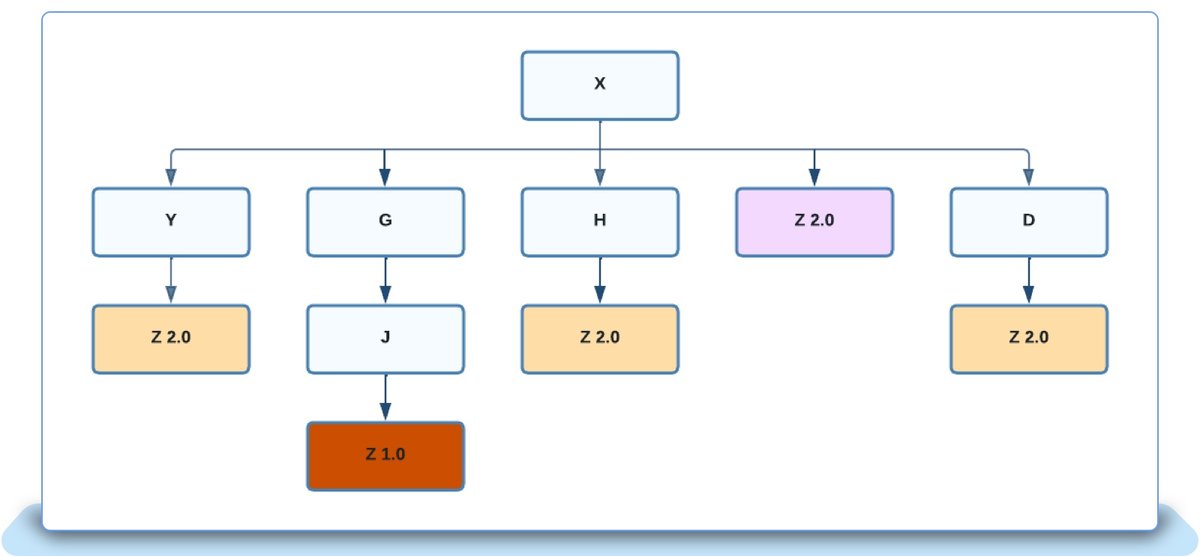
Image Credits goes to Ebay
From above after x → Z 2.0 will be selected.
This rule is simple, predictable, and crucial for large systems.
Maven Life cycle
Maven does not run arbitrary (not any order / sometimes random or unfair) commands.
It executes predefined life cycles, each consisting of ordered phases.
Important principle:
Life cycle phases do nothing by themselves.
Only plugins perform work.
Maven Lifecycles
Maven has three lifecycles:
clean
default
site
Clean Lifecycle
Phases:
pre-clean
clean
post-clean
Purpose:
remove build artifacts
ensure clean builds
clean phase deletes the target directory.
Command:
mvn clean
Default Lifecycle
This is the most important lifecycle.
Key phases:
validate
compile
test
package
verify
install
deploy
Below is the same life cycle explanation, but strictly with Maven commands, what exact command you run, and what Maven actually executes.
Clean, technical, no fluff.
Maven Default Life cycle Phases with Commands
1. validate
Command:
mvn validate
What Maven does:
Reads
pom.xmlChecks:
XML correctness
required fields (
groupId,artifactId,version)project structure validity
What it does NOT do:
No compilation
No dependency download for building
Use case:
CI sanity check
Early failure detection
2. compile
Command:
mvn compile
What Maven does:
Runs all phases before compile
Compiles Java source code
Internally:
src/main/java → target/classes
Plugin involved:
maven-compiler-plugin:compile
What it does NOT do:
No tests
No JAR creation
3. test
Command:
mvn test
What Maven does:
- Runs:
validate → compile → test
Internally:
- Compiles test code:
src/test/java → target/test-classes
- Executes unit tests
Plugin involved:
maven-surefire-plugin:test
Behavior:
If any test fails → build fails
Artifact is NOT created
4. package
Command:
mvn package
What Maven does:
- Runs:
validate → compile → test → package
Internally:
Takes compiled classes
Bundles them into an artifact
Output:
target/my-app.jar
(or .war, depending on packaging)
Plugin involved:
maven-jar-plugin:jar
Use case:
Create distributable binary
Still not shared with other projects
5. verify
Command:
mvn verify
What Maven does:
- Runs:
validate → compile → test → package → verify
Internally:
Runs additional checks such as:
integration tests
code quality checks
custom validation plugins
No default behavior unless plugins are bound.
Use case:
CI pipelines
Quality gates
6. install
Command:
mvn install
What Maven does:
- Runs:
validate → compile → test → package → verify → install
Internally:
- Copies artifact to local repository
Location:
~/.m2/repository/
Example:
~/.m2/repository/com/pexeltech/my-app/1.0.0/my-app-1.0.0.jar
Plugin involved:
maven-install-plugin:install
Use case:
- Allow other local Maven projects to depend on this artifact
7. deploy
Command:
mvn deploy
What Maven does:
Runs the entire lifecycle
Uploads artifact to a remote repository
Internally:
Pushes artifact + POM to:
Nexus
Artifactory
Maven Central (if configured)
Plugin involved:
maven-deploy-plugin:deploy
Use case:
Release builds
CI/CD pipelines
Clean Lifecycle (Related but Separate)
Command:
mvn clean
What Maven does:
- Deletes:
target/
Plugin involved:
maven-clean-plugin:clean
Often combined with:
mvn clean package
mvn clean install
Key Rule (Must Memorize)
Running a later phase automatically runs all earlier phases.
Example:
mvn install
Is equivalent to:
mvn validate
mvn compile
mvn test
mvn package
mvn verify
mvn install
Key rule:
Running any phase runs all previous phases automatically.
Example:
mvn package
Runs:
validate → compile → test → package
Maven Plugins
Maven itself does almost nothing.
All real work is performed by plugins.
A plugin is a collection of executable units called goals.
Plugin and Goal Model
Conceptual mapping:
Plugin → Toolbox
Goal   → Tool
Examples:
maven-compiler-plugin
compile
testCompile
maven-surefire-plugin
- test
What Is a Goal?
A goal is a single executable task.
Examples:
compiler:compile
surefire:test
jar:jar
shade:shade
Each goal performs one responsibility.
Default Goal Bindings
Maven automatically binds certain plugin goals to lifecycle phases.
Examples:
compile phase → compiler:compile
test phase    → surefire:test
package phase → jar:jar
clean phase   → clean:clean
These bindings are predefined by Maven.
Bound Plugin Goals
A bound goal is a goal that executes automatically when a life cycle phase runs.
You do not invoke it manually.
When a phase executes, all goals bound to that phase are executed in order.
Custom Goal Binding Using <executions>
Consider the configuration:
<executions>
  <execution>
    <phase>package</phase>
    <goals>
      <goal>shade</goal>
    </goals>
  </execution>
</executions>
This configuration means:
When Maven reaches the package phase, it must also execute the shade goal.
Real-Life Analogy
Normal behavior:
- Package phase creates a JAR
Custom behavior:
- At packaging time, also merge all dependencies into the JAR
The configuration is an automation rule:
IF phase == package
THEN run shade goal
What Is the Shade Goal?
The shade goal belongs to the maven-shade-plugin.
It:
takes your project JAR
takes all dependency JARs
merges them into a single executable JAR called One FAT JAR
This is commonly used in:
microservices
CLI tools
standalone Java applications
Internal Execution Flow
When you run:
mvn package
Maven performs:
validate
compile
test
package
   ├── jar:jar       (default binding)
   └── shade:shade   (custom binding)
Multiple goals can be bound to the same phase.
Complete Maven Execution Model
High-level flow:
Command (mvn install)
      ↓
Read pom.xml
      ↓
Resolve dependencies
      ↓
Determine lifecycle
      ↓
For each phase:
      ↓
Execute all bound plugin goals
      ↓
Produce artifact
      ↓
Store artifact in repository
Maven is essentially:
a dependency resolver
a life cycle engine
a plugin execution framework
an artifact distribution system
Why This Matters
Understanding Maven at this level teaches:
build system design
dependency graph resolution
artifact versioning
software supply-chain architecture
These concepts are transferable to:
NPM
Gradle
Bazel
internal build tools
custom package managers
Conclusion
Maven is not magic.
It is a predictable, rule-based system built on:
artifacts
repositories
life cycles
plugins
goal bindings
Once these fundamentals are clear, Maven becomes simple, powerful, and extensible.
This understanding is the foundation required to design your own build or package management system from scratch.
That’s all for today’s entry ! I will catch you in the next post until then, Keep Building and Happy Engineering !